Project Reporting
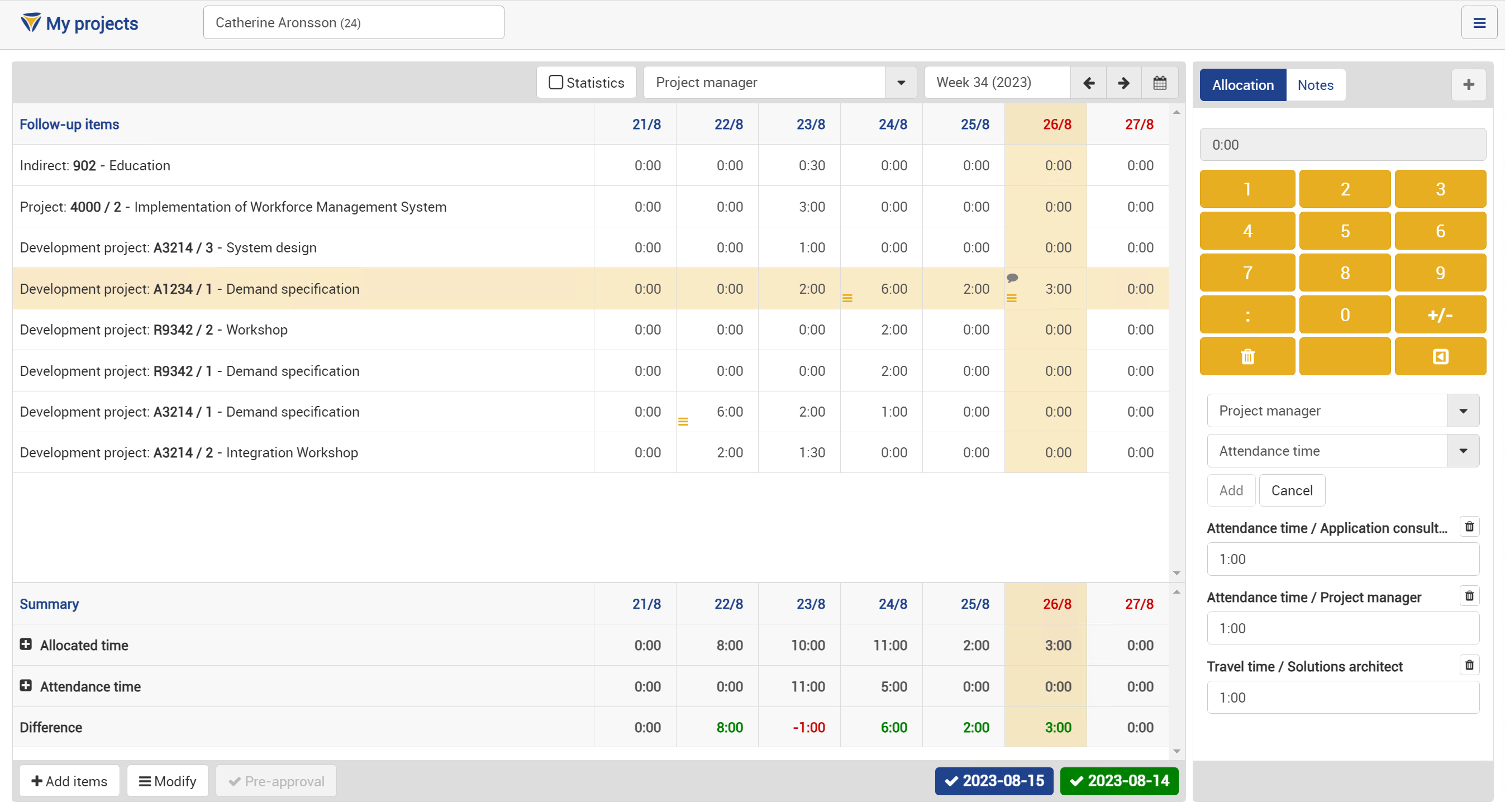
With Time Keys project reporting it is easy to monitor projects and underlying activities in relation to project plan, expected time consumption and budget. Project reporting is integrated with Time Keys time and attendance module and allows allocation of registered attendance time on different projects/activities. The project follow-up takes into consideration different types of attendance such as ordinary working hours, overtime, inconvenient working hours.
Regardless of ERP- or MPS system Time Key can be integrated to ensure that these systems at all times work with updated information.
Configuration and Authority allocation
- Set-up of new projects
- Set-up of different underlying activities within a project
- Authority configuration regarding rights for personnel to register time spent on projects
- Authority configuration of allowed ways for project registration (real-time or post-time)
Allocation of Project Time
- Show open (released) projects to which the user is authorized
- Allocate time on projects and underlying activities
- Allocate qualified attendance time such as Inconvenient working hours, overtime, travel time
- Allocate time with different roles that the user can have in a project
Review and Adjustment of Allocated Project Time
- Possibility to select groups/individuals
- Possibility to examine and adjust registered time
Project Reports
With Time Key's report generator, users can create and schedule reports such as:
- Spent time per project/activity
- Spent time per person

Frequently asked questions about Time Key
Is Time Key a WFM system or a time and attendance system?
Time Key is a complete Workforce Management System (WFM) in which time and attendance is one of the modules. The other modules are staff scheduling and shift planning, project reporting, production reporting, operational follow-up and a report generator. All modules are integrated so that time is only registered once, via web, mobile app or touch-screen terminal.
How much does Time Key cost?
Time Key is delivered as a SaaS service for a fixed monthly fee based on the number of users, selected modules and service level (SLA). System administration and user support (BPO) can be added. Contact us for a quote tailored to your organisation.
Which collective agreements does Time Key support?
Time Key handles the rules of Swedish collective agreements, including the Steel and Metal agreement, Teknikavtalet, Almega Industri, Allokemisk Industri, Grafisk Industri, IKEM, the Pulp and Paper agreement, the Sawmill agreement, the Ports and Stevedoring agreement and the Warehousing and E-commerce agreement, combined with locally negotiated deviations. Rules for overtime, unsocial hours, daily rest and flexitime are configured per agreement and local arrangement.
What size of company is Time Key suited for?
Time Key is used by companies with roughly 300 to more than 10,000 users in manufacturing, steel, mining and forestry, warehousing and logistics. Customers include Sandvik, SSAB, Epiroc, Södra, Atlas Copco, Alleima, ICA and Volvo Cars.
How is Time Key delivered and hosted?
Time Key is delivered as SaaS for a fixed fee based on scope, volume and SLA, hosted in Sweden on dedicated servers with a 24/7/365 SLA, support on weekdays 08–17 with on-call support at other times, daily backups and monthly SLA reports. The service can be extended with system administration and user support as an outsourced service (BPO).
Can Time Key be integrated with payroll and HR systems?
Yes. Approved time, absence and staffing data are exported to payroll, and employee and organisation master data can be imported from the HR system. Integrations with ERP and SSO are also available.
Can Time Key be integrated with WMS and ERP or logistics systems?
Yes. Time Key can be integrated with WMS, ERP and other logistics systems for synchronizing data on inventory, production and staffing.
How do employees report their time in Time Key?
Via web, mobile app for iOS and Android, or touch-screen terminal. In the mobile app users can book attendance, absence, projects and staffing, approve time and read and send messages. The touch-screen terminal keeps working during network outages.
